The Beginner’s Guide to VPNs and Online Privacy
What is a VPN and How Does It Work?
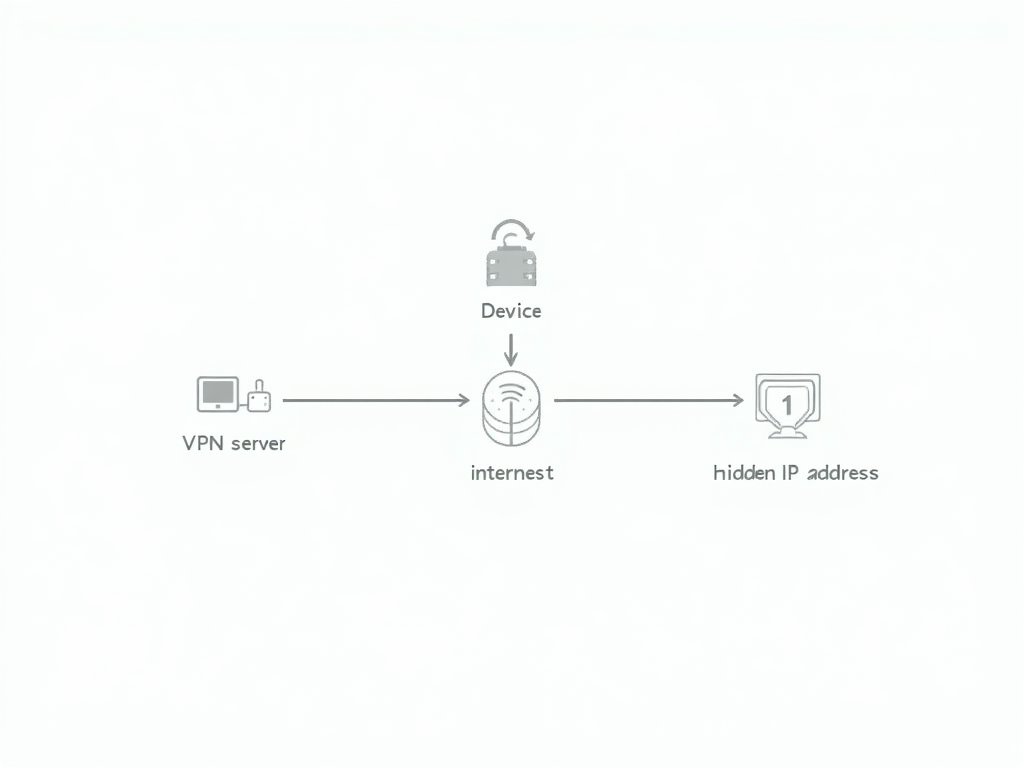
A Virtual Private Network (VPN) is a tool that allows you to create a secure, encrypted connection to another network over the internet. When you connect to a VPN, your internet traffic is routed through a remote server, which hides your IP address and encrypts your data. This makes it much harder for anyone to track your online activities or steal your personal information.
Here's how it works: 1. You connect to a VPN server using special software or an app on your device. 2. The VPN server establishes a secure, encrypted tunnel between your device and the server. 3. All of your internet traffic is sent through this tunnel, making it appear as if your traffic is coming from the VPN server rather than your actual location. 4. This hides your IP address and makes it difficult for websites, advertisers, or hackers to track your online activities.
Using a VPN has several benefits for online privacy and security: - It protects your data from being intercepted by hackers or snoopers, especially when using public Wi-Fi networks. - It allows you to access geo-restricted content by making it appear as if you're located in a different country. - It helps prevent your internet service provider (ISP) from tracking your online activities and selling your data to advertisers.
However, it's important to note that not all VPNs are created equal. Some VPN providers may log your data or sell it to third parties, which defeats the purpose of using a VPN for privacy. That's why it's crucial to choose a reputable VPN provider that has a strict no-logs policy and strong encryption standards.
Choosing the Right VPN for Your Needs
With so many VPN providers available, it can be overwhelming to choose the right one for your needs. Here are some factors to consider when selecting a VPN provider: - Privacy and security: Look for a VPN provider that has a strict no-logs policy, uses strong encryption standards (such as AES-256), and offers features like a kill switch and DNS leak protection. - Speed and performance: A good VPN should not significantly slow down your internet connection. Look for providers that offer fast speeds and have servers located in multiple countries. - Ease of use: The VPN software or app should be user-friendly and easy to set up, even for beginners. - Price: VPN prices can vary widely, from free to several dollars per month. Be wary of free VPNs, as they may log your data or show ads. Paid VPNs typically offer better privacy and security features. - Customer support: Look for providers that offer 24/7 customer support and have a good reputation for resolving issues quickly.
Here's a comparison of some popular VPN services:
| VPN Provider | Privacy and Security | Speed and Performance | Ease of Use | Price | Customer Support |
|---|---|---|---|---|---|
| NordVPN | Excellent | Fast | Easy | $3.71/month | 24/7 live chat |
| ExpressVPN | Excellent | Very fast | Easy | $8.32/month | 24/7 live chat |
| Surfshark | Good | Fast | Easy | $2.49/month | 24/7 live chat |
| ProtonVPN | Excellent | Good | Moderate | $4.00/month | Email support |
When setting up and using a VPN, here are some tips to keep in mind: - Always connect to the VPN before browsing the internet or using online services. - Choose a server location that is close to your actual location for better speeds. - Use the kill switch feature to ensure that your internet connection is cut off if the VPN connection drops. - Regularly update your VPN software or app to ensure you have the latest security features.
Other Online Privacy Tools and Best Practices
While a VPN is an essential tool for online privacy, it's not the only one. Here are some other tools and best practices to help you stay safe and secure online:
Password Management 101: Keeping Your Accounts Secure
One of the most important aspects of online privacy is using strong, unique passwords for all of your accounts. However, remembering multiple complex passwords can be challenging. That's where password managers come in.
A password manager is a tool that securely stores all of your passwords in an encrypted vault, accessible only with a master password. This allows you to use strong, unique passwords for each account without having to remember them all.
When choosing a password manager, look for one that: - Uses strong encryption standards - Offers two-factor authentication - Has a good reputation for security and privacy - Is easy to use and integrates with your devices and browsers
Some popular password managers include LastPass, 1Password, and Bitwarden.
To set up a password manager, follow these steps: 1. Choose a password manager and create an account. 2. Set a strong master password that you can remember but is difficult for others to guess. 3. Install the password manager app or browser extension on your devices. 4. Start adding your accounts and passwords to the vault. 5. Use the password manager to generate strong, unique passwords for new accounts.

Secure Email Services
Another important aspect of online privacy is using secure email services that protect your communications from prying eyes. One such service is Proton Mail, which offers end-to-end encryption and is based in Switzerland, known for its strong privacy laws.
To set up Proton Mail, follow these steps: 1. Go to the Proton Mail website and create an account. 2. Choose a username and password for your account. 3. Set up two-factor authentication for added security. 4. Start using Proton Mail to send and receive encrypted emails.
Proton Mail also offers a VPN service, ProtonVPN, which can be used in conjunction with their email service for enhanced privacy.

Additional Tools and Techniques
Here are some other tools and techniques you can use to protect your online privacy: - Use a privacy-focused web browser: Browsers like Brave and Firefox offer built-in privacy features, such as ad-blocking and tracking protection. - Enable two-factor authentication: Whenever possible, enable two-factor authentication for your online accounts to add an extra layer of security. - Be cautious with public Wi-Fi: Avoid using public Wi-Fi networks for sensitive activities, or use a VPN to encrypt your connection. - Regularly update your software: Keep your operating system, apps, and antivirus software up to date to protect against security vulnerabilities. - Be mindful of what you share online: Think twice before sharing personal information on social media or other online platforms.
Putting It All Together: A Comprehensive Approach to Online Privacy
To truly protect your online privacy, it's important to take a comprehensive approach that integrates multiple tools and best practices. Here's how you can do it: - Use a VPN consistently: Make it a habit to connect to your VPN whenever you're online, especially when using public Wi-Fi or accessing sensitive information. - Manage your passwords effectively: Use a password manager to generate and store strong, unique passwords for all of your accounts. - Secure your communications: Use secure email services like Proton Mail for sensitive communications, and consider using encrypted messaging apps for private conversations. - Stay informed and vigilant: Keep up with the latest online privacy trends and threats, and be proactive in protecting your digital life.
By following these steps and making online privacy a priority, you can enjoy a safer, more secure online experience.
Summary:
In this beginner's guide to VPNs and online privacy, we've covered the basics of using a VPN to protect your online activities, choosing the right VPN provider, and other essential tools and best practices for staying safe and secure online. By following these tips and integrating these tools into your daily routine, you can take control of your digital privacy and enjoy a more secure online experience.